Commands
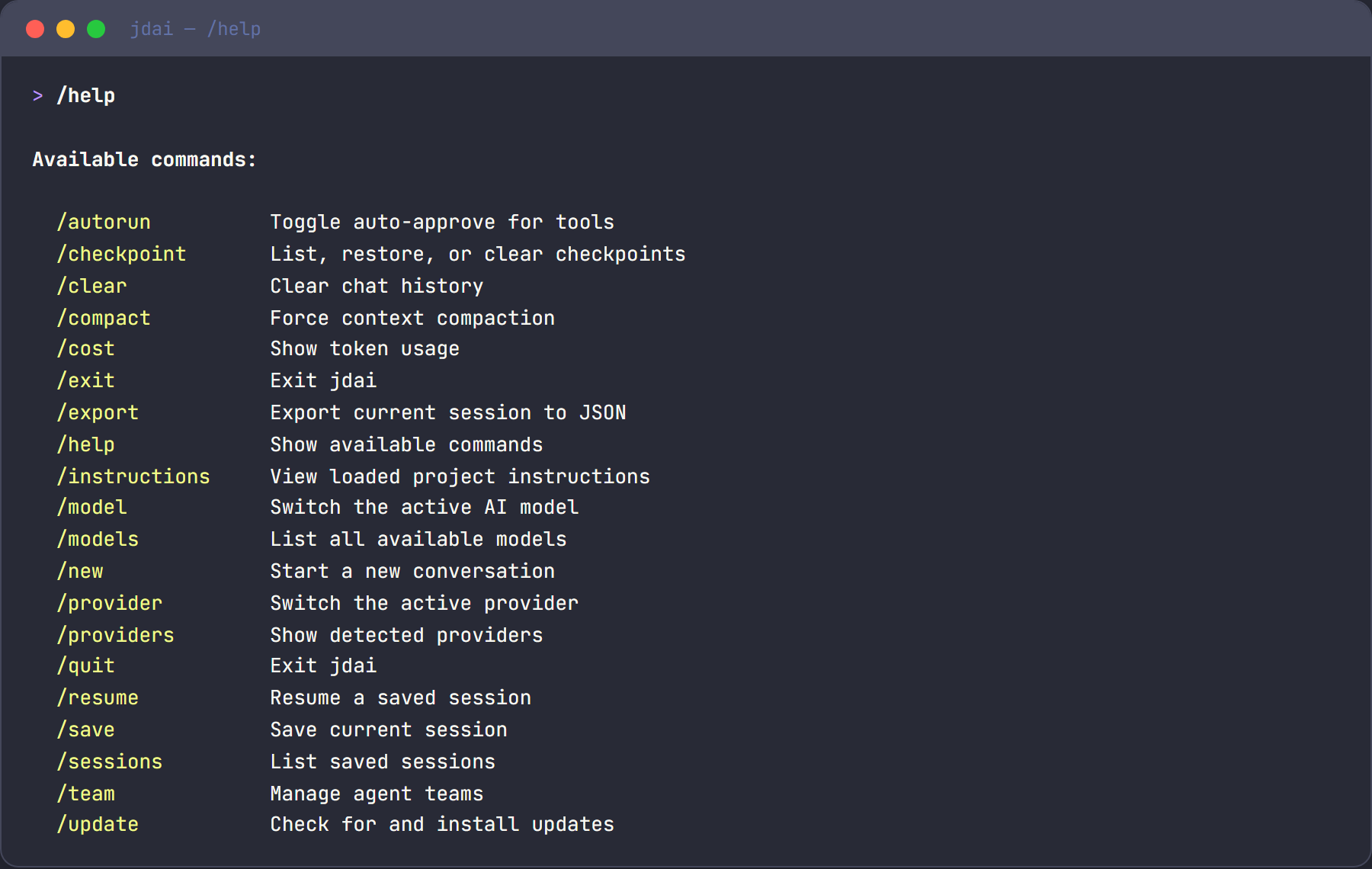
Slash commands are typed at the > prompt prefixed with /. Type /help to see all available commands. This page groups commands by task with brief descriptions and examples. For full details on every parameter, see the Commands Reference.
Getting help
| Command |
Description |
/help |
Show all available commands with descriptions |
/docs [topic] |
Show documentation links (filter by topic: providers, config, local, etc.) |
/doctor |
Run health diagnostics — provider connectivity, disk space, memory, session store |
/help
/docs providers
/doctor
The /doctor command outputs a human-readable report:
=== JD.AI Doctor ===
Version:  1.0.0
Runtime:  .NET 10.0.0
Health:   ✔ Healthy

Checks:
  ✔ Gateway       — Gateway operational
  ✔ Providers     — 2/3 providers reachable
  ✔ Memory        — 142 MB managed heap
  ✔ Session Store — SQLite OK (14 sessions)
Model and provider management
| Command |
Description |
/models |
List available models and mark the active session model |
/model [current\|list\|set <id>] |
Show/list/set the session model (set is runtime-only) |
/model search <query> |
Search models with optional provider/capability/sort filters |
/model url <url> |
Pull a model from a URL |
/reasoning [auto\|none\|low\|medium\|high\|max] |
Show or set session reasoning effort |
/providers |
List detected providers with connection status |
/provider |
Interactive picker to switch providers |
/provider add <name> |
Configure an API-key provider interactively |
/provider remove <name> |
Remove stored credentials |
/provider test [name] |
Test provider connectivity |
/model current
/model list
/model set gpt-4o
/model search llama 70b
/model search --provider openrouter --cap reasoning --sort cost llama
/model search --sort popularity gpt
/reasoning high
/providers
/provider add openai
/provider test
Defaults
| Command |
Description |
/default |
Show current default provider and model |
/default provider <name> |
Set global default provider |
/default model <id> |
Set global default model |
/default project provider <name> |
Set per-project default provider |
/default project model <id> |
Set per-project default model |
/default provider openai
/default model gpt-4o
/default project provider ollama
Defaults are saved to ~/.jdai/config.json (global) or .jdai/defaults.json (per-project).
Session management
| Command |
Description |
/sessions |
List recent sessions with ID, name, path, and turns |
/resume [id] |
Resume a previous session (interactive picker if no ID) |
/name <name> |
Name the current session for easy recall |
/save |
Explicitly save the current session |
/history |
Show turn-by-turn history with token counts |
/export |
Export session to JSON at ~/.jdai/exports/ |
/name feature-authentication
/save
/sessions
/resume abc123
See Sessions & History for more details.
Context management
| Command |
Description |
/clear |
Clear the entire conversation history |
/compact |
Summarize the conversation to free context window space |
/cost |
Show token usage: prompt tokens, completion tokens, total cost |
/compact
/cost
Tip
Run /compact proactively before the context window fills up — not after. Use /cost to monitor token usage.
Audit and security
| Command |
Description |
/audit |
Show recent audit events from the in-memory buffer |
/audit --severity <level> |
Filter events by minimum severity (debug, info, warning, error, critical) |
/audit --limit <n> |
Limit the number of events shown (default: 20) |
/audit
/audit --severity warning
/audit --limit 50
See Audit Logging for the full audit model, event schema, and external sink configuration.
Safety controls
| Command |
Description |
/autorun |
Toggle auto-approve mode for tool execution |
/permissions |
Toggle all permission checks |
Warning
Disabling confirmations means the agent can write files, run commands, and commit code without asking. Use in trusted environments only.
Local model management
| Command |
Description |
/local list |
List registered GGUF models |
/local add <path> |
Register a model file or directory |
/local scan [path] |
Scan for .gguf files |
/local search <query> |
Search HuggingFace for GGUF models |
/local download <repo-id> |
Download a model from HuggingFace |
/local remove <id> |
Remove a model from the registry |
/local search llama 7b
/local download TheBloke/Mistral-7B-Instruct-v0.2-GGUF
/local list
See Local Models for the full guide.
Checkpointing
| Command |
Description |
/checkpoint list |
Show all checkpoints |
/checkpoint restore <id> |
Restore to a checkpoint |
/checkpoint clear |
Remove all checkpoints |
See Checkpointing for details on strategies and configuration.
Workflows
| Command |
Description |
/workflow |
List all captured workflows |
/workflow list |
Show workflow catalog with IDs and step counts |
/workflow show <id> |
Display steps of a specific workflow |
/workflow export <id> |
Export a workflow to JSON |
/workflow replay <id> |
Re-execute a workflow |
/workflow refine <id> |
Edit a workflow before replaying |
/workflow list
/workflow replay abc123
Project and environment
| Command |
Description |
/update |
Check for new versions on NuGet |
/instructions |
Show loaded project instructions |
/sandbox |
Show current execution mode |
Plugin management
| Command |
Description |
/plugins or /plugins list |
List installed plugins and runtime status |
/plugins install <path-or-url> |
Install and enable a plugin package |
/plugins enable <id> |
Enable an installed plugin |
/plugins disable <id> |
Disable a plugin without uninstalling |
/plugins update [id] |
Update one plugin (or all plugins when omitted) |
/plugins uninstall <id> |
Remove an installed plugin |
/plugins info <id> |
Show source, version, load state, and errors |
/plugins
/plugins install ./artifacts/My.Plugin.1.0.0.nupkg
/plugins update
/plugins update my-plugin
Skills lifecycle
| Command |
Description |
/skills or /skills status |
Show active/excluded/shadowed/invalid skill status with reason codes |
/skills reload |
Refresh managed skill state from source directories and config |
/skills
/skills reload
Customization
| Command |
Description |
/spinner [style] |
Change the loading animation (none, minimal, normal, rich, nerdy) |
/spinner nerdy
Exiting
| Command |
Description |
/quit or /exit |
Exit JD.AI (unsaved sessions are auto-saved) |
Quick reference
| Command |
Description |
/help |
Show help |
/models |
List models |
/model <id> |
Switch model |
/providers |
List providers |
/provider |
Manage providers |
/default |
Manage defaults |
/clear |
Clear conversation |
/compact |
Compress context |
/cost |
Token usage |
/audit |
Inspect audit events |
/autorun |
Toggle auto-approve |
/sessions |
List sessions |
/resume |
Resume session |
/save |
Save session |
/checkpoint |
Manage checkpoints |
/local |
Manage local models |
/workflow |
Manage workflows |
/skills |
Show/reload managed skills |
/doctor |
Health diagnostics |
/quit |
Exit |
For complete parameter documentation, see the Commands Reference.