Provider Setup
JD.AI supports 15 AI providers. This guide walks through setting up each one — from quick environment variable configuration to the interactive /provider add wizard.
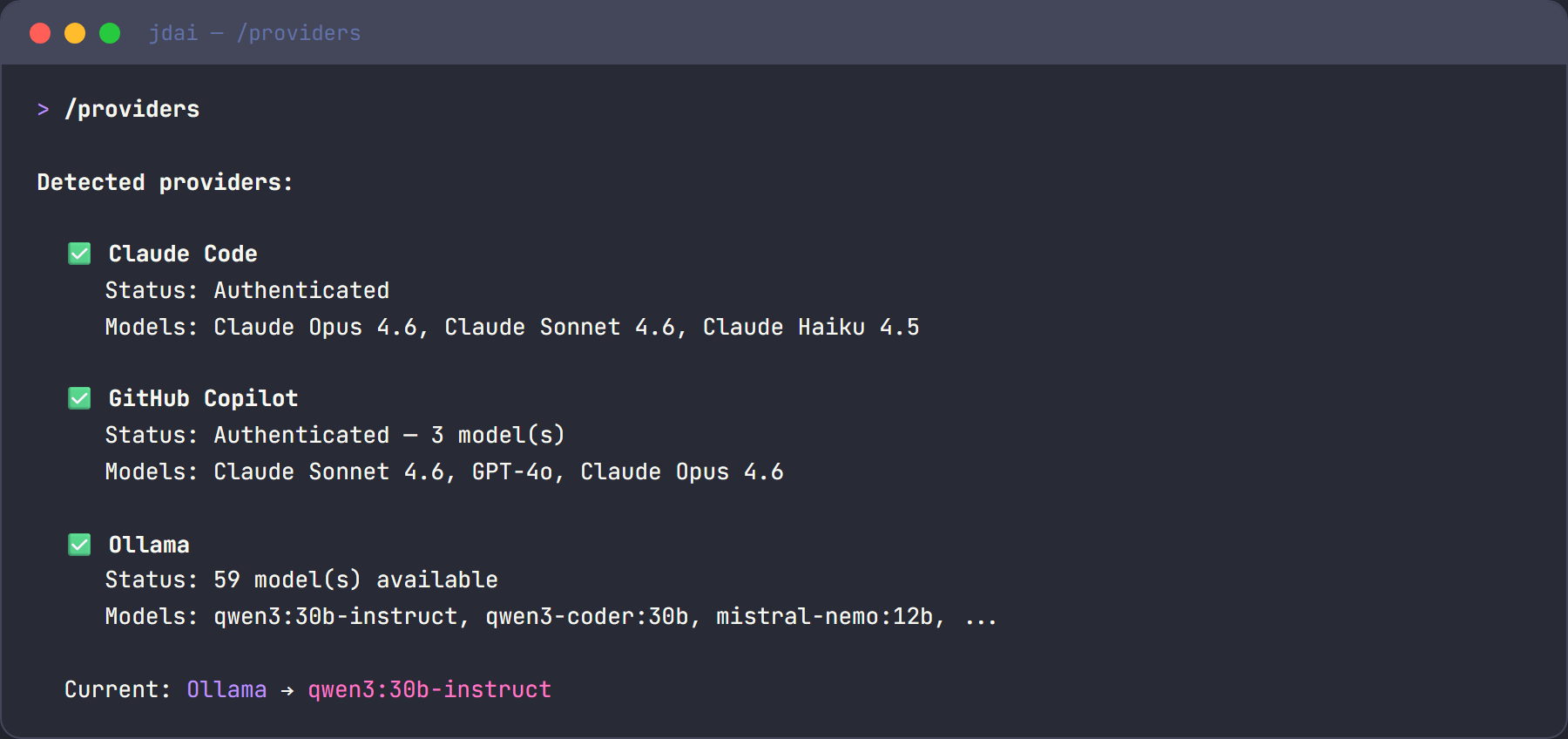
Provider overview
JD.AI detects providers automatically on startup. Providers fall into three authentication categories:
| Category | Providers | Auth method |
|---|---|---|
| OAuth / session | Claude Code, GitHub Copilot, OpenAI Codex | CLI authentication |
| Local | Ollama, Local (LLamaSharp), Foundry Local | No auth needed |
| API key | OpenAI, Azure OpenAI, Anthropic, Google Gemini, Mistral, AWS Bedrock, HuggingFace, OpenRouter, OpenAI-Compatible | API key or credentials |
Quick setup with /provider add
The fastest way to configure any API-key provider is the interactive wizard:
/provider add
The wizard walks you through selecting a provider, entering credentials, and verifying connectivity. Credentials are saved to the encrypted store automatically.
You can also target a specific provider directly:
/provider add openai
/provider add anthropic
/provider add azure-openai
OAuth / session providers
These providers authenticate through their own CLI tools. Install the CLI, log in, and JD.AI discovers the session automatically.
Claude Code
- Install the Claude Code CLI:
npm install -g @anthropic-ai/claude-code - Authenticate:
claude auth login - Launch JD.AI — it detects the session automatically.
Models available: Claude Sonnet, Opus, and Haiku.
Note
JD.AI automatically enables Claude prompt caching for larger prompts by default, including Claude Code OAuth sessions.
Control it with /config set prompt_cache on|off and /config set prompt_cache_ttl 5m|1h.
Tip
Best for complex reasoning, long-form code generation, and nuanced analysis.
GitHub Copilot
- Authenticate via GitHub CLI:
Or sign in through the VS Code GitHub Copilot extension.gh auth login --scopes copilot - JD.AI detects available Copilot models automatically.
Models available: GPT-4o, Claude Sonnet, Gemini, and more (depends on your subscription).
Tip
Best for teams already using GitHub who want access to multiple model families.
OpenAI Codex
- Install the Codex CLI:
npm install -g @openai/codex - Authenticate:
Or set thecodex auth loginOPENAI_API_KEYenvironment variable directly. - JD.AI detects the session automatically.
Models available: All OpenAI chat models (GPT-4o, GPT-4.1, o3, etc.).
Tip
Best for teams using OpenAI models who want the Codex CLI's authentication flow.
Local providers
These providers run models on your machine. No internet connection or API keys required.
Ollama
- Install Ollama from ollama.com.
- Start the server:
ollama serve - Pull a chat model:
ollama pull llama3.2 - Optionally pull an embedding model for semantic memory:
ollama pull all-minilm
JD.AI auto-detects all available models at http://localhost:11434.
Environment variable: OLLAMA_ENDPOINT (default: http://localhost:11434)
Tip
Best for offline usage, privacy, fast iteration, and experimentation.
Local models (LLamaSharp / GGUF)
Run GGUF models directly in-process — no external service needed:
jdai --provider local
- Place
.ggufmodel files in~/.jdai/models/(or any directory). - JD.AI detects them automatically on startup.
- Or download interactively:
/local search llama 7b
/local download TheBloke/TinyLlama-1.1B-Chat-v1.0-GGUF
Environment variable: JDAI_MODELS_DIR (default: ~/.jdai/models/)
See Local Models for the full guide.
Tip
Best for air-gapped environments, privacy-sensitive workloads, and fully standalone operation.
Microsoft Foundry Local
jdai --provider foundry-local
Uses locally available Foundry models. No API key required — models run on-device via the Foundry Local runtime.
API key providers
Set an environment variable or use /provider add to store credentials securely.
OpenAI
# Environment variable
export OPENAI_API_KEY=sk-...

# Or CLI flag
jdai --provider openai

# Or interactive setup
/provider add openai
Environment variable: OPENAI_API_KEY
Models available: GPT-4o, GPT-4.1, o3, o4, and more (discovered dynamically).
Tip
Best for direct OpenAI API access without the Codex CLI overhead.
Azure OpenAI
# Environment variables
export AZURE_OPENAI_API_KEY=...
export AZURE_OPENAI_ENDPOINT=https://myresource.openai.azure.com/

# Or CLI flag (prompts for credentials)
jdai --provider azure-openai

# Or interactive setup
/provider add azure-openai
Environment variables: AZURE_OPENAI_API_KEY, AZURE_OPENAI_ENDPOINT
Default deployments: gpt-4o, gpt-4o-mini, gpt-4
Tip
Best for enterprise environments with private endpoints and compliance requirements.
Anthropic
# Environment variable
export ANTHROPIC_API_KEY=sk-ant-...

# Or CLI flag
jdai --provider anthropic

# Or interactive setup
/provider add anthropic
Environment variable: ANTHROPIC_API_KEY
Models available: Claude Opus 4, Sonnet 4, 3.7 Sonnet, 3.5 Haiku, 3.5 Sonnet v2.
Note
This is separate from the Claude Code provider, which uses OAuth via the CLI.
JD.AI automatically enables Claude prompt caching for larger prompts by default (both API-key and OAuth/session paths). Control it with /config set prompt_cache on|off and /config set prompt_cache_ttl 5m|1h.
Google Gemini
# Environment variable
export GOOGLE_AI_API_KEY=...

# Or interactive setup
/provider add google-gemini
Environment variable: GOOGLE_AI_API_KEY
Models available: Gemini 2.5 Pro, 2.5 Flash, 2.0 Flash, 1.5 Pro, 1.5 Flash.
Mistral
# Environment variable
export MISTRAL_API_KEY=...

# Or interactive setup
/provider add mistral
Environment variable: MISTRAL_API_KEY
Models available: Mistral Large, Medium, Small, Codestral, Nemo, Ministral 8B.
AWS Bedrock
# Environment variables
export AWS_ACCESS_KEY_ID=...
export AWS_SECRET_ACCESS_KEY=...
export AWS_REGION=us-east-1

# Or interactive setup
/provider add bedrock
Environment variables: AWS_ACCESS_KEY_ID, AWS_SECRET_ACCESS_KEY, AWS_REGION
Uses IAM-based authentication via the AWS SDK credential chain.
Models available: Claude (via Bedrock), Amazon Nova, Llama, and other foundation models.
HuggingFace
# Environment variable
export HUGGINGFACE_API_KEY=hf_...

# Or interactive setup
/provider add huggingface
Environment variable: HUGGINGFACE_API_KEY
Models available: Llama 3.3 70B, Llama 3.1 8B, Mixtral 8x7B, Phi-3, Qwen 2.5 72B.
OpenRouter
OpenRouter is a unified API that routes requests to hundreds of AI models from multiple vendors (OpenAI, Anthropic, Google, Meta, Mistral, and more) through a single endpoint.
# Environment variable
export OPENROUTER_API_KEY=sk-or-...

# Or interactive setup
/provider add openrouter
Environment variable: OPENROUTER_API_KEY
Models available: Dynamically discovered from the OpenRouter catalog — includes Claude, GPT-4, Gemini, Llama, Mistral, and hundreds more. Each model includes context length, pricing, and capability metadata.
For the full guide — model discovery, pricing, model selection — see OpenRouter.
Tip
Best for accessing multiple model families through a single API key, comparing models, and pay-per-use pricing across vendors.
OpenAI-Compatible endpoints
Connect to any OpenAI-compatible API — Groq, Together AI, DeepSeek, Fireworks, Perplexity, LM Studio, vLLM, and more.
# Provider-specific environment variables (auto-detected)
export GROQ_API_KEY=...
export TOGETHER_API_KEY=...
export DEEPSEEK_API_KEY=...

# Or interactive setup for custom endpoints
/provider add openai-compat
Auto-detected providers and their environment variables:
| Provider | Env variable | Base URL |
|---|---|---|
| Groq | GROQ_API_KEY |
https://api.groq.com/openai/v1 |
| Together AI | TOGETHER_API_KEY |
https://api.together.xyz/v1 |
| DeepSeek | DEEPSEEK_API_KEY |
https://api.deepseek.com/v1 |
| Fireworks AI | FIREWORKS_API_KEY |
https://api.fireworks.ai/inference/v1 |
| Perplexity | PERPLEXITY_API_KEY |
https://api.perplexity.ai |
For custom endpoints (LM Studio, vLLM, etc.), use /provider add openai-compat and enter an alias, base URL, and optional API key.
Credential resolution chain
When JD.AI needs a credential, it checks sources in this order:
- CLI flags —
--provider,--api-key, etc. - Environment variables —
OPENAI_API_KEY,ANTHROPIC_API_KEY, etc. - Encrypted credential store —
~/.jdai/credentials.enc - OAuth / session tokens — Claude Code, GitHub Copilot, Codex sessions
The first source that provides a valid credential wins.
Encrypted credential store
All credentials saved through the /provider add wizard are stored encrypted:
- Windows — DPAPI (Data Protection API)
- macOS / Linux — AES-256 encryption with a machine-scoped key
Credentials are stored in ~/.jdai/credentials.enc and are never written in plain text.
Switching providers and models
Use slash commands to manage providers at any time during a session:
/providers               # List all detected providers with status
/provider                # Interactive picker to switch providers
/provider list           # Detailed provider list
/provider test           # Test all provider connections
/provider test openai    # Test a specific provider
/provider remove mistral # Remove stored credentials
/models                  # List all available models
/model gpt-4.1           # Switch to a specific model
For faster startup, save a project default provider/model with the onboarding wizard:
jdai onboard
# alias:
jdai wizard
# unified setup route:
jdai setup --skip-daemon
This stores your selected provider/model as project defaults so startup can refresh only that provider.
When you switch models mid-session, JD.AI prompts you to choose a transition mode:
| Mode | Description |
|---|---|
| Preserve | Keep the full conversation history as-is |
| Compact | Summarize the conversation before switching |
| Transform | Re-format messages for the new model's style |
| Fresh | Start a clean conversation (history discarded) |
| Cancel | Abort the switch |
Environment variables reference
| Variable | Provider | Description |
|---|---|---|
OPENAI_API_KEY |
OpenAI / Codex | OpenAI API key |
AZURE_OPENAI_API_KEY |
Azure OpenAI | Azure OpenAI API key |
AZURE_OPENAI_ENDPOINT |
Azure OpenAI | Azure OpenAI endpoint URL |
ANTHROPIC_API_KEY |
Anthropic | Anthropic API key |
GOOGLE_AI_API_KEY |
Google Gemini | Google AI API key |
MISTRAL_API_KEY |
Mistral | Mistral API key |
AWS_ACCESS_KEY_ID |
AWS Bedrock | AWS access key ID |
AWS_SECRET_ACCESS_KEY |
AWS Bedrock | AWS secret access key |
AWS_REGION |
AWS Bedrock | AWS region (default: us-east-1) |
HUGGINGFACE_API_KEY |
HuggingFace | HuggingFace API token |
OPENROUTER_API_KEY |
OpenRouter | OpenRouter API key |
GROQ_API_KEY |
Groq | Groq API key |
TOGETHER_API_KEY |
Together AI | Together AI API key |
DEEPSEEK_API_KEY |
DeepSeek | DeepSeek API key |
FIREWORKS_API_KEY |
Fireworks AI | Fireworks AI API key |
PERPLEXITY_API_KEY |
Perplexity | Perplexity API key |
OLLAMA_ENDPOINT |
Ollama | Ollama API URL (default: http://localhost:11434) |
JDAI_MODELS_DIR |
Local Models | Model directory (default: ~/.jdai/models/) |
HF_TOKEN |
HuggingFace | HuggingFace token (legacy) |
See also
- Local Models — full guide to running GGUF models locally
- Configuration — global defaults, per-project overrides, and environment variables
- Troubleshooting — provider connection issues and solutions