AI Providers
JD.AI detects and connects to AI providers automatically on startup. No manual configuration is required — install a provider, authenticate if needed, and JD.AI handles the rest.
Provider detection
On startup, JD.AI checks for available providers in this order:
- Claude Code — checks for a local CLI session
- GitHub Copilot — checks for GitHub authentication
- OpenAI Codex — checks for Codex CLI authentication or
OPENAI_API_KEY - Ollama — checks for a local server at
localhost:11434 - Local (LLamaSharp) — scans
~/.jdai/models/for GGUF model files
The first provider with a valid connection becomes the default. Results are shown on startup:
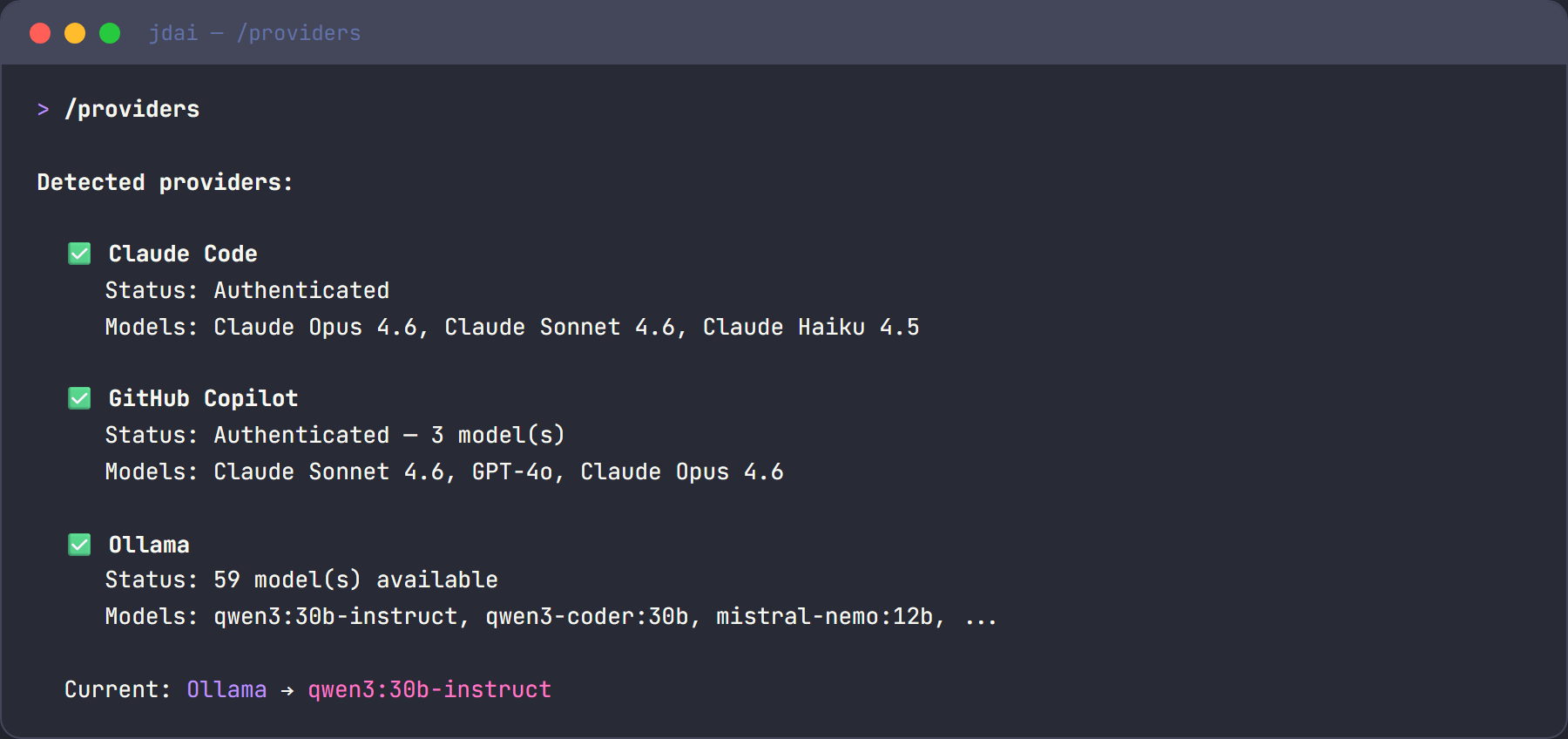
Claude Code
Setup:
- Install Claude Code:
npm install -g @anthropic-ai/claude-code - Authenticate:
claude auth login - JD.AI detects the session automatically
How it works:
- Uses the Claude Code CLI's OpenAI-compatible endpoint.
- Supports Claude Sonnet, Opus, and Haiku models.
- Auto-refresh: JD.AI attempts to renew expired sessions.
Tip
Best for: Complex reasoning, long-form code generation, and nuanced analysis.
GitHub Copilot
Setup:
- Authenticate via GitHub CLI:
gh auth login --scopes copilot - Or via VS Code: sign in to the GitHub Copilot extension.
- JD.AI detects available Copilot models.
How it works:
- Uses Copilot token exchange for OpenAI-compatible API access.
- Available models include GPT-4o, Claude Sonnet, Gemini, and more.
- Auto-refresh: JD.AI attempts to renew expired tokens.
Tip
Best for: Teams already using GitHub and access to multiple model families.
Ollama
Setup:
- Install Ollama from https://ollama.com.
- Start the server:
ollama serve - Pull models:
ollama pull llama3.2(chat) andollama pull all-minilm(embeddings). - JD.AI auto-detects all available models.
How it works:
- Connects to the local Ollama API at
http://localhost:11434. - Lists all locally available models.
- No authentication required.
Tip
Best for: Offline usage, privacy, fast iteration, and experimentation.
OpenAI Codex
Setup:
- Install the Codex CLI:
npm install -g @openai/codex - Authenticate:
codex auth login(or setOPENAI_API_KEYenvironment variable) - JD.AI detects the session automatically.
How it works:
- Uses the Codex CLI's OAuth token exchange for API access.
- Credential resolution: API key → access token →
OPENAI_API_KEYenv →CODEX_TOKENenv →~/.codex/auth.json→ device code login. - Supports all OpenAI chat models (GPT-4o, GPT-4.1, o3, etc.).
Tip
Best for: Teams using OpenAI models who want the Codex CLI's authentication flow.
Local models (LLamaSharp)
Setup:
- Place
.ggufmodel files in~/.jdai/models/(or any directory). - JD.AI detects them automatically on startup.
- Or download directly:
/local download TheBloke/TinyLlama-1.1B-Chat-v1.0-GGUF
How it works:
- Loads GGUF models in-process via LLamaSharp (C# bindings for llama.cpp).
- Auto-detects GPU hardware (CUDA, Metal) and falls back to CPU.
- No external service or internet connection required.
- Manage models with
/localcommands: list, add, scan, search, download, remove.
Tip
Best for: Air-gapped environments, privacy-sensitive workloads, and fully standalone operation.
See Local Models for the full guide.
Switching providers and models
Use slash commands to manage providers and models at any time during a session:
/providers          # List all detected providers with status
/provider           # Show current provider and model
/models             # List all available models across providers
/model qwen3:30b    # Switch to a specific model
Provider comparison
| Feature | Claude Code | GitHub Copilot | OpenAI Codex | Ollama | Local (LLamaSharp) |
|---|---|---|---|---|---|
| Setup | CLI auth | GitHub auth | CLI auth / API key | Local install | Drop in .gguf files |
| Internet required | Yes | Yes | Yes | No | No |
| Cost | Claude subscription | Copilot subscription | OpenAI subscription | Free (local) | Free (local) |
| Model variety | Claude family | Multi-family | OpenAI family | Open source | Any GGUF model |
| Speed | Fast | Fast | Fast | Depends on hardware | Depends on hardware |
| Privacy | Cloud | Cloud | Cloud | Fully local | Fully local |
| Embedding support | Yes | Limited | Yes | Yes | No |
Environment variables
| Variable | Description | Default |
|---|---|---|
OLLAMA_ENDPOINT |
Ollama API URL | http://localhost:11434 |
OPENAI_API_KEY |
OpenAI / Codex API key (if not using CLI auth) | — |
CODEX_TOKEN |
Codex CLI access token override | — |
JDAI_MODELS_DIR |
Local model storage directory | ~/.jdai/models/ |
HF_HOME |
HuggingFace cache directory | ~/.cache/huggingface/ |
HF_TOKEN |
HuggingFace API token | — |