Subagents
Subagents are specialized AI instances that handle specific tasks in isolation. Each subagent runs with its own Semantic Kernel, chat history, and scoped tool access — keeping the parent conversation clean and focused.
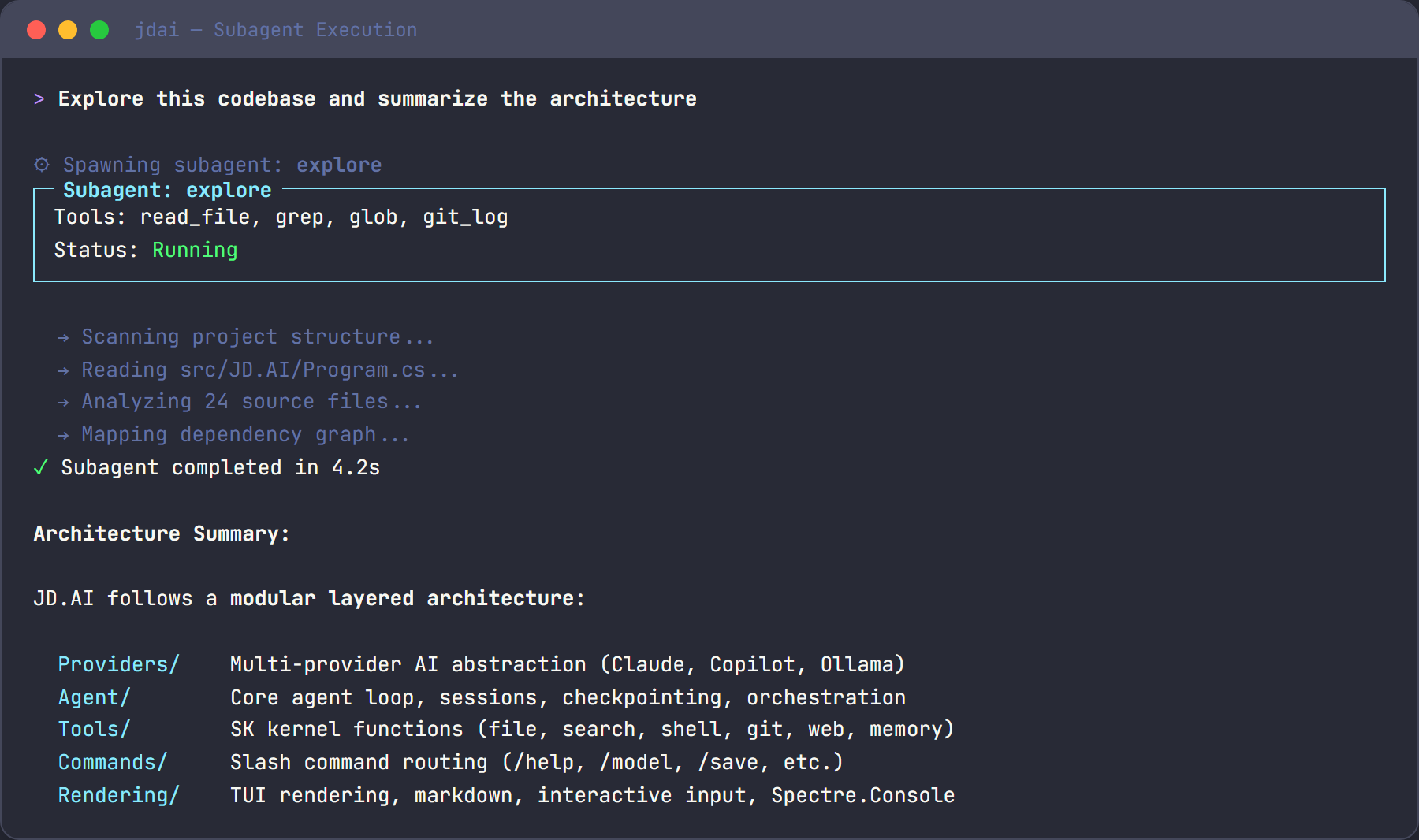
Why use subagents?
- Context isolation. Subagent work stays out of the parent conversation, preserving your context window for decision-making.
- Scoped tools. Each subagent type has access to only the tools it needs, reducing risk and improving focus.
- Parallel execution. Multiple subagents can run concurrently, enabling complex workflows without sequential bottlenecks.
- Specialization. Each type is optimized for its task with an appropriate model preference and toolset.
Subagent types
JD.AI provides five subagent types. Choose the narrowest type that fits your task.
explore
Fast, read-only codebase analysis. Cannot modify files or run commands.
Tools: read_file, grep, glob, git_log, list_directory
Model preference: Fast/cheap — optimized for quick responses
Use explore for understanding code, finding files, and answering questions about architecture:
use an explore agent to find how authentication works
task
Execute commands and report results. Has shell access but cannot write files.
Tools: run_command, read_file, list_directory
Model preference: Fast/cheap
Use task for running tests, builds, and scripts:
use a task agent to run the full test suite and report results
plan
Create detailed implementation plans. Has search and memory access for structured reasoning.
Tools: read_file, grep, glob, memory_store, memory_search
Model preference: Smart/capable — needs strong reasoning
Use plan for creating implementation roadmaps and change strategies:
use a plan agent to design a strategy for migrating the data layer to EF Core
review
Code review with git diff access. Read-only analysis plus git comparison tools.
Tools: read_file, grep, git_diff, git_log, git_status
Model preference: Smart/capable
Use review for reviewing changes, comparing branches, and code quality analysis:
use a review agent to check my staged changes for bugs and style issues
general
Full-capability subagent with access to all tools. Equivalent to the main agent.
Tools: All tools Model preference: Same as parent
Use general sparingly — it has full access and uses more resources:
use a general agent to refactor the retry logic and verify the tests still pass
Execution modes
Subagents support two execution modes that control how they process a request.
Single-turn (default)
One prompt produces one response. The subagent receives the prompt, reasons over it, and returns a single answer. No tool calls are made.
spawn_agent(type: "explore", prompt: "...", mode: "single")
Use single-turn when the answer can be produced from the prompt alone — summaries, explanations, or plans that don't require reading files.
Multi-turn
Full agentic loop with iterative tool calling. The subagent can invoke tools, inspect results, and continue reasoning until the task is complete.
spawn_agent(type: "task", prompt: "...", mode: "multi")
Use multi-turn when the task requires interacting with the codebase or executing commands.
Capability matrix
| Type | File Read | File Write | Shell | Git | Search | Memory |
|---|---|---|---|---|---|---|
explore |
✅ | ❌ | ❌ | log only | ✅ | ❌ |
task |
✅ | ❌ | ✅ | ❌ | ❌ | ❌ |
plan |
✅ | ❌ | ❌ | ❌ | ✅ | ✅ |
review |
✅ | ❌ | ❌ | ✅ | ✅ | ❌ |
general |
✅ | ✅ | ✅ | ✅ | ✅ | ✅ |
Nesting
Subagents can spawn their own subagents, enabling hierarchical task decomposition. The maximum nesting depth is configurable and defaults to 2.
For example, a general subagent implementing a feature might spawn an explore subagent to understand existing code, then a task subagent to run tests after making changes.
Tips
- Prefer
explore. It is fast, cheap, and keeps your context clean. Use it as your default research tool. - Use
multimode only when needed. Single-turn is faster and cheaper — switch to multi-turn only when the task requires iterative tool use. - Use
generalsparingly. It has full access and consumes the most resources. Reach for a narrower type first. - Compose teams for complex work. Combine an
exploreagent for research, aplanagent for strategy, and ataskagent for execution. Coordinate from your main session.