jdgerkinator — Gherkin Generator
AI-powered tool that converts acceptance criteria into
Gherkin .feature files, optionally
integrating with existing Reqnroll /
SpecFlow step definitions.
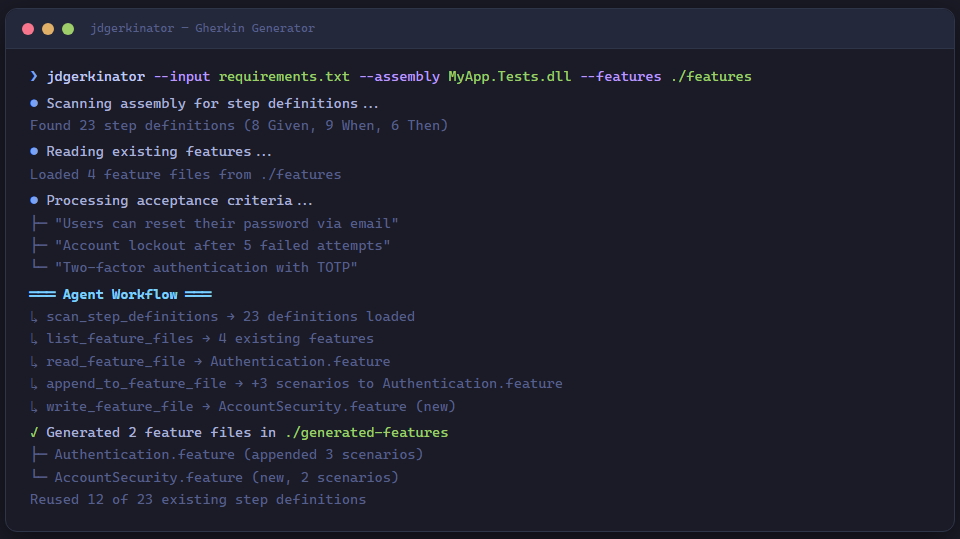
Demo
Quick start
# Install the tool
dotnet tool install -g JD.Tools.GherkinGenerator

# Pipe acceptance criteria from stdin
echo "Users can reset their password via email" | jdgerkinator

# Read criteria from a file
jdgerkinator --input requirements.txt --output ./features

# Scan an assembly for existing step definitions
jdgerkinator --assembly ./bin/Debug/net8.0/MyApp.Tests.dll \
             --features ./features \
             --input requirements.txt
CLI reference
Usage:  jdgerkinator [options]

Options:
  -a, --assembly <path>   .NET assembly DLL to scan for step definitions
  -f, --features <dir>    Directory of existing .feature files to integrate with
  -o, --output <dir>      Output directory for generated files
                          (default: ./generated-features)
  -m, --model <model>     Claude model (default: claude-sonnet-4-6)
  -i, --input <file>      File containing acceptance criteria
                          (reads from stdin if omitted)
  --version               Show version information
  -?, -h, --help          Show help and usage information
How it works
flowchart LR
    A[Acceptance Criteria] --> B[Claude Agent]
    C[Step Definitions] -.->|optional| B
    D[Existing Features] -.->|optional| B
    B --> E[.feature files]
1. Input collection
The tool reads acceptance criteria from --input or interactively from stdin.
When --assembly is provided, the StepDefinitionScannerPlugin uses
System.Reflection.MetadataLoadContext to inspect the assembly for
[Given], [When], and [Then] attributes without loading it into the
runtime.
2. Context gathering
If --features points to a directory of existing .feature files, the
FeatureFilePlugin reads them so Claude can integrate new scenarios into
existing features rather than creating duplicates.
3. Agentic generation
Claude receives:
- The acceptance criteria text
- Available step definitions (if scanned)
- Existing feature files (if provided)
It then autonomously calls plugin functions to:
- Scan step definitions (
scan_step_definitions) - List and read existing features (
list_feature_files,read_feature_file) - Write new or appended
.featurefiles (write_feature_file,append_to_feature_file)
4. Output
Generated .feature files are written to the output directory, following
standard Gherkin syntax with proper Feature:, Scenario:, and step keywords.
Plugins
StepDefinitionScannerPlugin
Scans .NET assemblies for BDD step definitions using reflection-only loading.
| Function | Description |
|---|---|
scan_step_definitions |
Loads an assembly via MetadataLoadContext and extracts [Given], [When], [Then] attributes with their regex patterns, method names, and declaring types |
Supported attributes:
Reqnroll.GivenAttribute/WhenAttribute/ThenAttributeTechTalk.SpecFlow.GivenAttribute/WhenAttribute/ThenAttribute
FeatureFilePlugin
Reads and lists existing .feature files for context.
| Function | Description |
|---|---|
list_feature_files |
Recursively finds .feature files and extracts feature names and tags |
read_feature_file |
Returns the full content of a specific feature file |
GherkinWriterPlugin
Writes generated Gherkin to disk.
| Function | Description |
|---|---|
write_feature_file |
Creates a new .feature file (creates directories as needed) |
append_to_feature_file |
Appends scenarios to an existing .feature file |
get_feature_template |
Returns a Gherkin template for reference |
Architecture
GherkinGenerator/
├── Program.cs                              # CLI entry point (System.CommandLine)
├── Models/
│   ├── StepDefinition.cs                   # record(Keyword, Pattern, MethodName, DeclaringType)
│   └── FeatureFile.cs                      # record(Path, FeatureName, Content, Tags)
└── Plugins/
    ├── StepDefinitionScannerPlugin.cs      # Assembly scanning via MetadataLoadContext
    ├── FeatureFilePlugin.cs                # .feature file reader
    └── GherkinWriterPlugin.cs              # .feature file writer
Examples
Basic — criteria from stdin
jdgerkinator <<'EOF'
As a user I want to log in with my email and password
so that I can access my account.

Acceptance criteria:
- Valid credentials grant access
- Invalid password shows an error
- Account locked after 5 failed attempts
EOF
With assembly scanning
jdgerkinator \
  --assembly ./tests/MyApp.AcceptanceTests/bin/Debug/net8.0/MyApp.AcceptanceTests.dll \
  --features ./tests/MyApp.AcceptanceTests/Features \
  --output ./tests/MyApp.AcceptanceTests/Features \
  --input ./docs/sprint-42-criteria.txt
This scans the test assembly for step definitions, reads existing features, and
generates new .feature files that reuse existing steps where possible.
Custom model
jdgerkinator --model claude-opus-4-6 --input complex-requirements.txt