jdxplr — Codebase Explorer
AI-powered codebase profiler that scans a project directory and generates a structured markdown knowledgebase — ideal for onboarding new developers, creating architecture documentation, or feeding context into other AI tools.
Demo
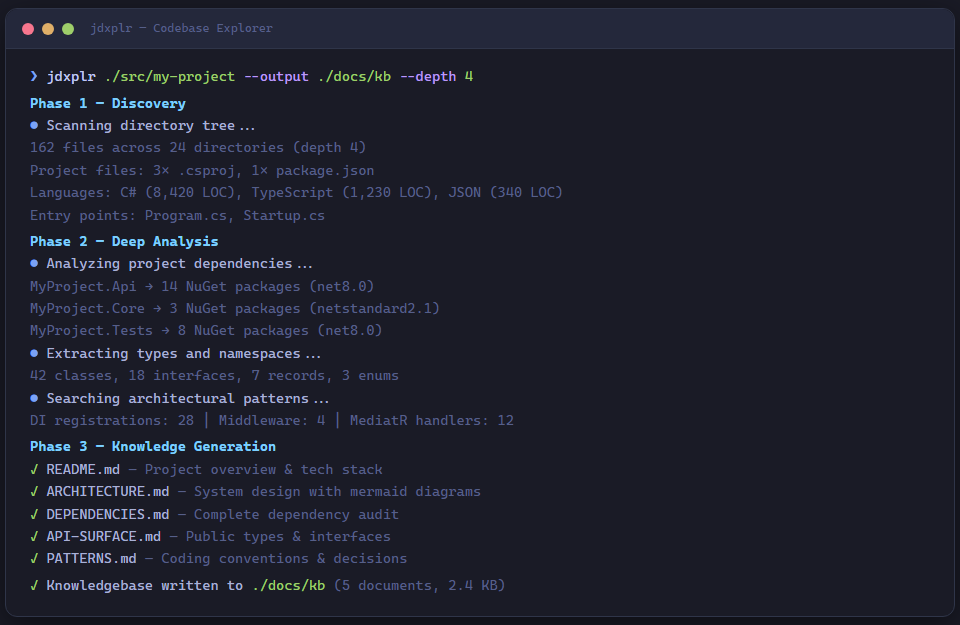
Quick start
# Install the tool
dotnet tool install -g JD.Tools.CodebaseExplorer

# Profile the current directory
jdxplr .

# Profile a specific project with custom output
jdxplr C:\git\my-project --output C:\docs\my-project-kb

# Deeper scan with a specific model
jdxplr . --depth 5 --model claude-opus-4-6
CLI reference
Usage:  jdxplr <path> [options]

Arguments:
  <path>                  Root directory of the codebase to analyze

Options:
  -o, --output <dir>      Output directory for knowledgebase documents
                          (default: <path>/.knowledgebase)
  -m, --model <model>     Claude model (default: claude-sonnet-4-6)
  -d, --depth <depth>     Maximum directory tree depth for scanning (default: 3)
  --version               Show version information
  -?, -h, --help          Show help and usage information
How it works
flowchart TD
    A[Discovery] --> B[Deep Analysis]
    B --> C[Knowledge Generation]

    subgraph A[Phase 1 — Discovery]
        A1[Directory tree scan]
        A2[Project file detection]
        A3[Line count by language]
        A4[Entry point identification]
    end

    subgraph B[Phase 2 — Deep Analysis]
        B1[Dependency extraction]
        B2[Namespace & type enumeration]
        B3[Architectural pattern search]
    end

    subgraph C[Phase 3 — Knowledge Generation]
        C1[README.md]
        C2[ARCHITECTURE.md]
        C3[DEPENDENCIES.md]
        C4[API-SURFACE.md]
        C5[PATTERNS.md]
    end
Phase 1 — Discovery
The agent uses FileSystemPlugin to build a map of the codebase:
| Step | Plugin function | Output |
|---|---|---|
| Directory tree | get_directory_tree |
Hierarchical listing up to --depth |
| Project detection | detect_project_files |
.csproj, package.json, Cargo.toml, etc. |
| Line counts | count_lines_by_extension |
Lines of code per file extension |
| Entry points | find_entry_points |
Program.cs, main.py, index.ts, etc. |
Phase 2 — Deep Analysis
Using CodeAnalysisPlugin, the agent drills into each project:
| Step | Plugin function | Output |
|---|---|---|
| .NET dependencies | analyze_csproj |
Target frameworks, NuGet packages |
| Node dependencies | analyze_package_json |
npm packages (prod + dev) |
| Namespaces & types | extract_namespaces_and_types |
Classes, interfaces, enums, records |
| Pattern search | search_for_patterns |
DI registrations, middleware, handlers |
Phase 3 — Knowledge Generation
Claude synthesizes findings into five structured documents via KnowledgeBaseWriterPlugin:
| Document | Contents |
|---|---|
| README.md | Project overview, tech stack, getting started guide |
| ARCHITECTURE.md | System design, component relationships, data flow (with mermaid diagrams) |
| DEPENDENCIES.md | Complete dependency audit with purpose annotations |
| API-SURFACE.md | Public types, interfaces, extension points |
| PATTERNS.md | Coding conventions, architectural decisions, observed patterns |
Plugins
FileSystemPlugin
Safe, read-only file system exploration with built-in exclusions for
bin/, obj/, node_modules/, .git/, and other ignored directories.
| Function | Description |
|---|---|
get_directory_tree |
Returns indented directory listing with configurable depth |
detect_project_files |
Finds project files across 10+ ecosystems (.NET, Node, Python, Java, Rust, Go, Ruby, PHP, Swift, Kotlin) |
read_file_content |
Reads a file with size limits and binary detection |
count_lines_by_extension |
Aggregates line counts by file extension |
find_files_by_pattern |
Searches for files matching a glob-like pattern |
CodeAnalysisPlugin
Language-aware code analysis focused on .NET and Node.js projects.
| Function | Description |
|---|---|
analyze_csproj |
Parses .csproj XML for target frameworks, package references, and project references |
analyze_package_json |
Parses package.json for dependencies, scripts, and metadata |
find_entry_points |
Locates application entry points across multiple languages |
extract_namespaces_and_types |
Regex-based extraction of C# namespaces, classes, interfaces, enums, and records |
search_for_patterns |
Searches for configurable regex patterns across source files |
KnowledgeBaseWriterPlugin
Markdown document generation and management.
| Function | Description |
|---|---|
write_document |
Creates a markdown file in the output directory |
append_to_document |
Appends content to an existing document |
list_documents |
Lists all documents already written |
get_document_template |
Returns a structural template for a given document type |
Output structure
After a successful run, the output directory contains:
.knowledgebase/
├── README.md           # Project overview & getting started
├── ARCHITECTURE.md     # System design & component map
├── DEPENDENCIES.md     # Dependency audit
├── API-SURFACE.md      # Public API & extension points
└── PATTERNS.md         # Conventions & decisions
Each document uses:
- Mermaid diagrams for visual architecture and data flow
- File path citations linking to specific source files
- Tables for structured data (dependencies, types, patterns)
- Code snippets for key examples
Supported ecosystems
The tool detects and analyzes projects across these ecosystems:
| Ecosystem | Project file(s) | Dependency analysis |
|---|---|---|
| .NET | .csproj, .fsproj, .vbproj, .sln |
✓ (NuGet packages, project refs, TFMs) |
| Node.js | package.json |
✓ (npm dependencies, scripts) |
| Python | requirements.txt, pyproject.toml, setup.py |
Detection only |
| Java | pom.xml, build.gradle |
Detection only |
| Rust | Cargo.toml |
Detection only |
| Go | go.mod |
Detection only |
| Ruby | Gemfile |
Detection only |
| PHP | composer.json |
Detection only |
Examples
Profile the current repo
jdxplr . --output ./docs/knowledgebase
Deep scan for a large monorepo
jdxplr /src/enterprise-app --depth 6 --model claude-opus-4-6
Generate docs for a specific microservice
jdxplr ./services/payment-api --output ./docs/payment-api-kb --depth 4
Architecture
CodebaseExplorer/
├── Program.cs                              # CLI entry point (System.CommandLine)
├── Models/
│   ├── CodebaseProfile.cs                  # record(Languages, Frameworks, Projects, TotalLoc)
│   ├── ProjectInfo.cs                      # record(Name, Type, Frameworks, Dependencies, SourceFiles)
│   └── DependencyInfo.cs                   # record(Name, Version, Type, IsDevelopment)
└── Plugins/
    ├── FileSystemPlugin.cs                 # Safe file system exploration
    ├── CodeAnalysisPlugin.cs               # Language-aware code analysis
    └── KnowledgeBaseWriterPlugin.cs        # Markdown document writer